Five parts, one habit
Hear a word → keep it → train your ear on it → say it like them → catch new ones while you read.
Search — hear any word in real speech
Not a dictionary voice: real people in vlogs, interviews and news, cued to the second they say it.
- Type a word or phrase — it is matched as a whole phrase, not loose words.
- Replay or slow it down to 0.75× until you catch every sound.
- Next clip — hear the same word from someone else.

Library — keep what you looked up
Every word you searched, grouped by the site you were reading. Sort the ones that matter into folders.
- Sign in — your searches start landing in History by themselves.
- Save a clip’s word into a folder — as many folders and words as you like.
- Come back to any word and its clips in one click.
Dictations — train your ear
Captions hidden: hear a real moment, type the word, see exactly where your ear slipped. Slips come back until they stick.
- Daily — five new clips every morning.
- Endless — random words one after another, or dictate any YouTube video.
- My decks — built from the words you saved: one folder a day free, every folder with Pro.

Shadowing — say it like them
Hear a real line, say it back, and an AI tells you which sound gave you away — the “th”, the short “i”, a vowel you added.
- Daily — five lines every morning, free.
- Endless — 5 lines a day free, no limit with Pro.
- My decks — shadow the words you saved: one folder a day free, every folder with Pro.

Extension — hear words while you read
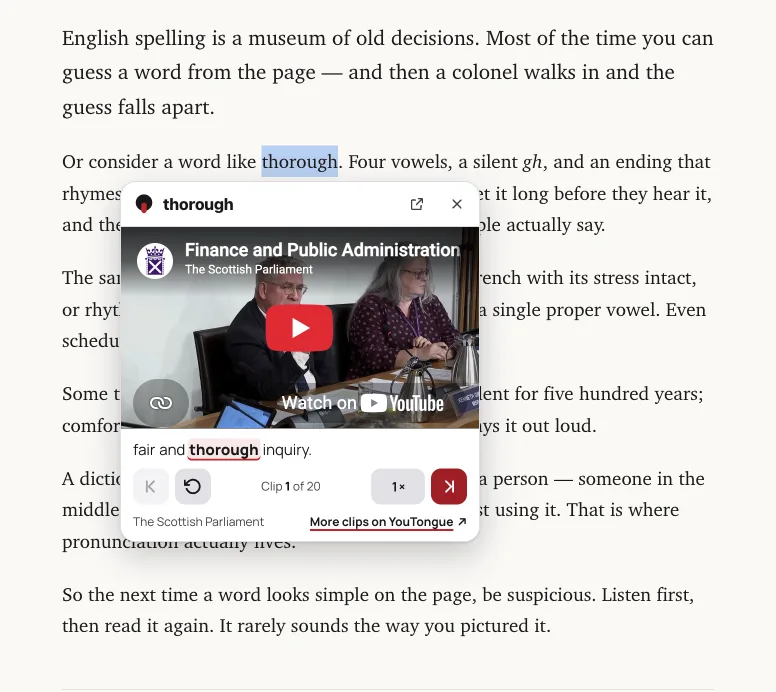
Select a word or phrase on any page and clips open right there. Signed in, it goes straight into your Library; with Pro, the card shows what it means.
- Add to Chrome — Edge, Brave and Arc work too.
- Select a word or phrase, up to 100 characters.
- Listen without leaving the page.